
How to Install Jenny Mod on Mobile (Bedrock/MCPE) — Android & iOS Complete Guide
Installing Jenny Mod on Android is simply different from the PC Edition. And it is quite confusing, especially when there is no complete guide for the installation method. This guide provides a complete step-by-step guide with a complete procedure and the safest links for user to get their Jenny mod file for Minecraft Pocket Edition (PE).
Players trying to play the Jenny mod in their Minecraft Bedrock edition are most likely to get confused in the process, but to be honest, it is as simple as installing the Jenny mod on pc. If you follow each step clearly and accurately, there is no chance of failure. But if you encounter any issues after the process, our troubleshooting guide will help you fix any problems regarding the mod installation process.
We also covered a comparison section of what Jenny Mod offers on mobile and what it offers on PC. There is also a working manual method when the automatic import fails. By the time you finish reading this guide, Jenny Mod will be running on your Minecraft PE.
⬩➤ What Is Jenny Mod for Minecraft Bedrock/MCPE?
Jenny Mod is actually a fan-made Minecraft modification originally developed by independent creator Schnurri_tv (also known as SlipperyTum). The mod was created to introduce interactive companion characters into the Minecraft world, making gameplay more dynamic and engaging. In the pixelated world of Minecraft, Jenny Mod Minecraft introduces a virtual girlfriend. By using this mod, players get an NPC character and create their own virtual world with a partner. For a brief description, visit the home page.
On the Java Edition, it runs from a .jar file, while on Bedrock Edition, it runs from a .mcaddon file or mcaddon pack. Unlike the Java edition, it does not require any modloader such as Forge. If you are looking for a complete guide on how to install Jenny Mod on PC, visit our guide.
how-to-install-jenny-mod-on-pc-java-edition/
Important Note: Most players are searching for JENNY MOD APK, but there is no legitimate Jenyy Mod APK game or anything. It only requires a few simple and important steps to give access to mods like Jenny Mod to users.The Bedrock addon version of Jenny Mod has been updated to support Minecraft versions up to 1.21.x, so if you updated Minecraft recently, the mod should still work. If you are running anything below Minecraft 1.17, update your game first before trying to install the addon.
⬩➤ Jenny Mod MCPE — Compatibility & Supported Versions
Before downloading anything, confirm your device and Minecraft version meet these requirements. A version mismatch is one of the top reasons the mod fails silently after install. If you are using a browser and need to pick colors or inspect UI elements, you can use this color picker extension to easily grab colors from any website.
| Detail | Requirement |
|---|---|
| File Format | .mcaddon / .mcpack |
| Minecraft Bedrock Version | 1.17.0 to 1.21.x |
| Android Version | 5.0 and above |
| iOS Version | 14.0 and above |
| Mod File Size | ~6.9 MB |
| Experimental Gameplay | Must be enabled |
| Install Method | Native Bedrock addon system |
| Modloader Required | None |
⬩➤ What You Need Before You Start
To start the installation, the first thing you need to have on your Android phone is a Jenny Mod .mcaddon file. You can simply download it from https://downloadjennymod.org/download/
It provides you with a virus-free and properly working .mcaddon pack. Save it to your downloads folder. Do not download any random file labeled as Jenny Mod; make sure to download it from a trusted source.
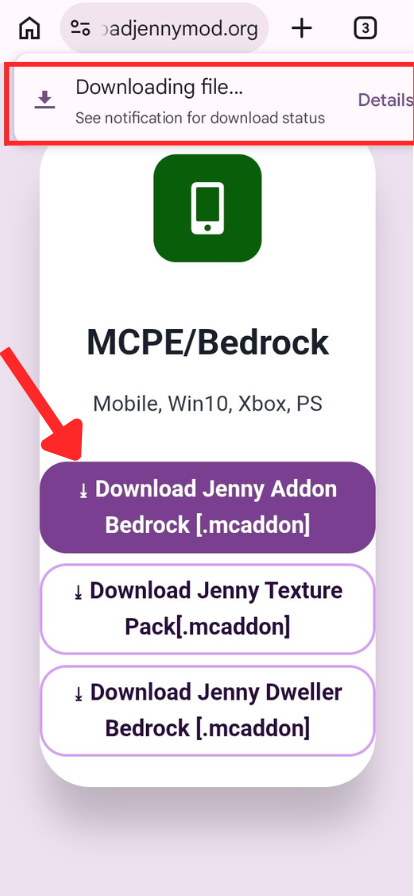
Now, the next step is to import the file into your Minecraft. Open your file manager and navigate to the downloaded .mcaddon file. Click it and tap “Open with Minecraft.” Minecraft will automatically import the file, as it does not require any mod loader. If nothing happens when you tap the file, or if Minecraft doesn’t launch, skip ahead to the manual installation section below. Don’t reinstall or redownload yet.
Most players think that the process is done, and they start exploring their inventory. But no, it’s not done yet; you have to do the following things to activate the packs.
Open Minecraft → tap Play → tap Create New World.
1. Activate the Behavior Pack: Open the World settings menu and navigate to the Behavior pack. Find Jenny Mod and click the + icon to activate it
2. Activate the Resource Pack: Now scroll to Resource Packs → do the same. Find the Jenny Mod resource pack → tap + to activate it.
2. Enable Experimental Gameplay: Scroll down to the Experiments section and click on Experimental Gameplay. Minecraft will show a warning about world stability — this is a standard warning, nothing to worry about. Tap Confirm and proceed. ⚠️ All three of these steps are required
After your world loads, the next thing you need to do is switch to Creative mode. Open your inventory and search for “Jenny Spawn Egg” in the search bar. If the installation was successful, you will see it appear.
If the spawn egg is not in your inventory at this point, do not panic — go straight to the troubleshooting guide before reinstalling anything.
⬩➤Manual Installation Method:
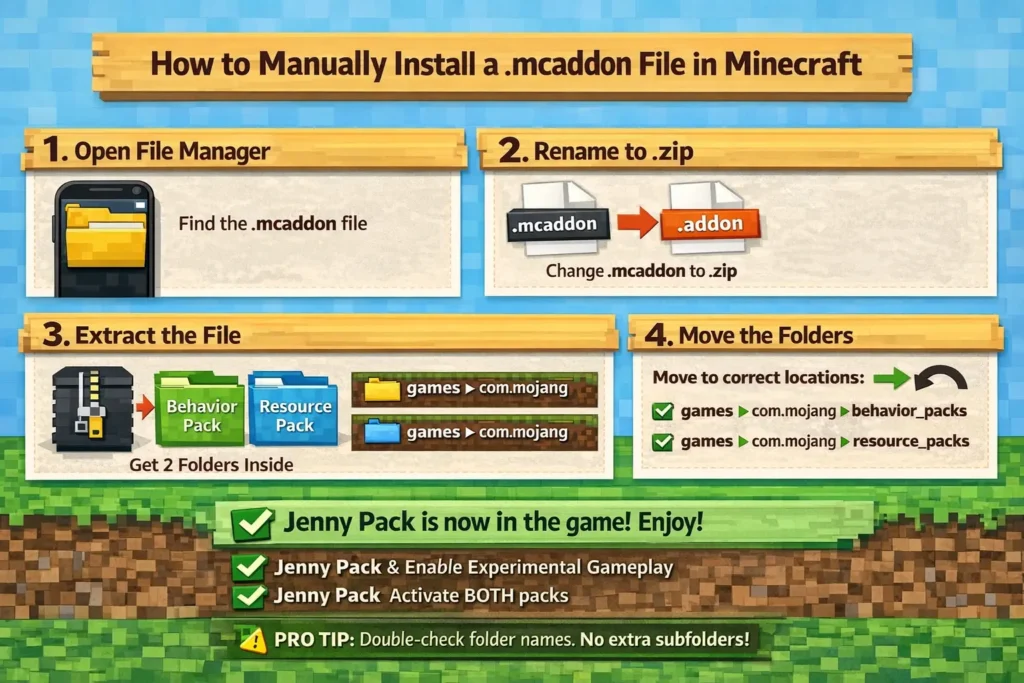
⬩➤ How to Enable Experimental Gameplay in Minecraft Bedrock
Many feature in different Minecraft addons are unlocked by experimental gameplay. To enable it, Open Minecraft → Play → Create New World → navigate to resource and behavior pack sections → find the Experiments toggle → turn it on → confirm the pop-up warning. Enabling experimental gameplay for one world does not carry it over to other worlds. You have to enable it per world. In any world, you have to follow the same settings to enable it.
⬩➤ Jenny Mod Features — Bedrock/MCPE vs Java Edition
| Feature | PC (Java Edition) | Mobile (Bedrock/MCPE) |
|---|---|---|
| Full character roster | Yes | Limited |
| All animations | Yes | Reduced |
| Uses Forge .jar | Yes | No (.mcaddon) |
| OptiFine support | Yes | No |
| Performance | Smoother | Varies by device |
| Installation difficulty | Moderate | Easier |
⬩➤ How to Remove Jenny Mod from MCPE
Players often think that removing the Jenny mod might affect their other Minecraft worlds, but it’s not true. You can easily remove the Jenny mod by following these steps.
Open Minecraft → go to the world running Jenny Mod → tap the pencil/edit icon → scroll to Behavior Packs → tap the Jenny pack → tap the minus (−) button to deactivate it. Also, remove the Resource Packs in the same way. Save the world. With these steps, Jenny and all related content will no longer appear in that world.
To fully delete the pack files from your device, follow the steps belowSettings → Storage → Behavior Packs → find Jenny Mod → delete. Same for Resource Packs. This frees the storage space and removes the pack from all world selection menus going forward.
⬩➤ Minecraft Didn’t Open When I Tapped the .mcaddon File
Many users face the problem that Minecraft doesn’t open when they click the downloaded .mcaddon file. The reason for this is that your phone has not set Minecraft as the default app for .mcaddon files. On Android, go to Settings → Apps → Minecraft → Open by Default → Add Link — or simply try the manual installation method described earlier in this guide. On iOS, restart your device and try the Files app Share method again
Visit the guide to solve all your Jenny Mod problems
Jenny Mod Troubleshooting and Fixes
⬩➤ Is Jenny Mod Safe to Install on Mobile?
The short answer is yes — when you download the correct file from a trustworthy source. downloadjennymod.org is a trusted source and provides its visitors with a complete guide and information about Jenny mod, as well as an antivirus-scanned and properly working file of the mod.
Avoid sites offering “Jenny Mod Premium APK,” “Jenny Mod Unlimited Version,” or any download that comes with pop-up redirects and “verification” steps. These are not Jenny Mod files. They are typically ad-farming sites or fake Minecraft APKs.
Download the .mcaddon file from a no-redirect source. Scan it with your phone’s built-in security scanner if you want extra peace of mind. The file size should be in the range of 6–10MB.
Important note: This mod contains mature content and is intended for players who are 18 years old or above.