
How to Install Jenny Mod on PC – Complete Step-by-Step Guide (Java Edition)
Most Minecraft players install the Jenny mod, find the guide, follow the steps, but still face issues like a black screen, Minecraft server crashes, and being unable to access the mod in the game. The reason is that mostly tutorials show only 4-5 basic steps with no Proper explanation, and skip the parts that actually cause the problems.
In this guide, you will find each and every step with an exact process from scratch. You will also get useful tips and tricks for your Minecraft Java Edition. By the time you finish reading, Jenny Mod will be running on your PC, and you’ll know exactly what to do if something goes wrong.
This guide is for Minecraft Java Edition on PC (Windows, Mac, and Linux). If you’re on mobile or using Bedrock Edition, we have a separate guide for that.
(How to install Jenny mod on mobile)
⬩➤ What Is Jenny Mod, and Why Does It Only Work on Java Edition?
Jenny Mod is actually a fan-made Minecraft modification originally developed by independent creator Schnurri_tv (also known as SlipperyTum). The mod was created to introduce interactive companion characters into the Minecraft world, making gameplay more dynamic and engaging. In the pixelated world of Minecraft, Jenny Mod Minecraft introduces a virtual girlfriend. By using this mod, players get an NPC character and create their own virtual world with a partner. For complete details, visit the Home page.
Jenny Mod not only works for Minecraft Java, but it is also available for the Mobile edition. Players using Minecraft Bedrock Edition use the Jenny add-on files to enable the features that Jenny Mod offers. Players cannot access the Jenny mod on mobile by using .jar files. As the topic of the guide is to install Jenny mod on PC, if you want to install Jenny mod on Minecraft Bedrock edition, visit our complete guide here.
Make sure you are using Minecraft Java edition. You can purchase it from the official Minecraft website, minecraft.net, to use Jenny Mod on PC. Also worth knowing: Jenny Mod is specifically built for Minecraft version 1.12.2. Minecraft went through major internal changes starting from version 1.13, and those changes broke compatibility with this mod. Newer Minecraft versions won’t load it properly — which is why version matching matters so much here.
⬩➤ Before You Install Anything — Go Through This Checklist
Skipping this step is the single biggest reason people run into problems. Take two minutes and verify each of these before you touch Forge or the mod file.
Step-by-Step Installation Guide:
Most of the time, you face the error of “Forge not loading” after the installation process. The reason is that Forge requires Java 8 to run. So in the first step, make sure that you correct version(JAVA 8) installed on your device. You can quickly verify your Java version by typing “java -version” in your command prompt or terminal.
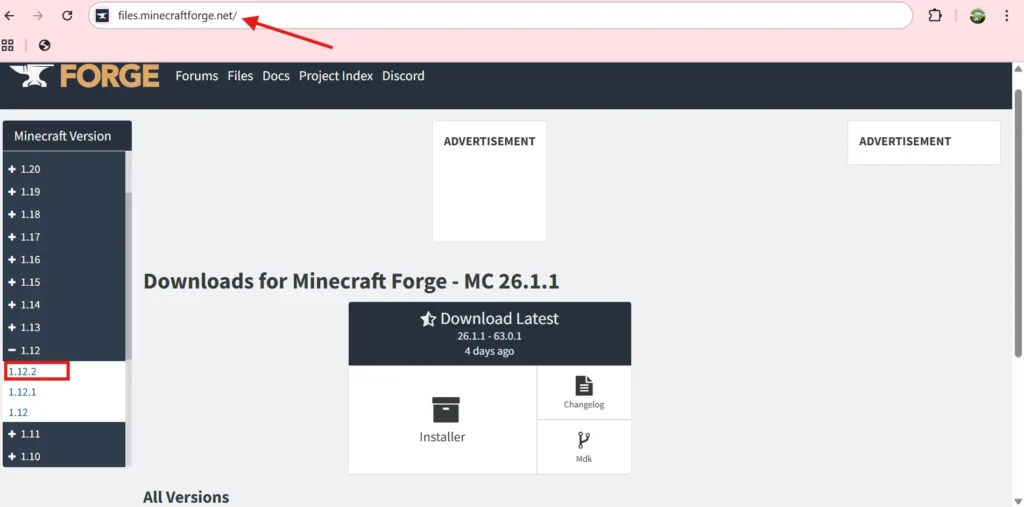
Mods like Jenny Mod in Minecraft require Forge to run. Go to files.minecraftforge.net and search for v1.12.2. Then open the installer and click “Install Client”. Once that finishes up, make sure there is a new profile in the Minecraft launcher with the name “Forge 1.12.2.”
Forge is an essential component in the whole process of installing jenny mod in minecraft. It is important to verify the step.
1: Correct version of forge installed.
2: A new profile name “Forge1.12.2”
This step confuses a lot of people, but it’s important. Before placing any mod files, you need to launch Minecraft using the Forge 1.12.2 profile. The reason is that Forge creates the mods folder automatically on first launch. If you skip this, the folder won’t exist yet.
Open the Minecraft Launcher. In the bottom-left installation selector, you should now see a new profile Forge1.12.2. Select it and click play. The minecraft will load slower then usual and it is normal for a first forge launch.
Once you’re on the main menu, close Minecraft. You don’t need to create a world yet.
The next step after installing Minecraft Forge is to locate the mods folder. Minecraft will only access the files that are present in the Mods folder. You can confirm whether the mods folder has been created or not. Press Windows+R, type %appdata%\.minecraft, and press Enter. This will open the roaming directory, and from there, navigate to the following path: .minecraft\mods.
If there is no mods folder, create it manually. Right-click and select New Folder. Confirm the folder name before creating it. Minecraft will not admit the mods if they are placed in the wrong directory. Name the folder mods with all lower-case letters with no spaces
Important: This is the part where most of the beginners make mistakes, so make sure to follow each instruction correctly from this step.
![how to install jenny mod on pc (step 4)[Find your mod folder]](https://downloadjennymod.org/wp-content/uploads/2026/04/step-4-final-1024x538.webp "How to Install Jenny Mod on PC – Complete Step-by-Step Guide (Java Edition) 3")
Certain websites on Google provide Jenny mod files full of viruses and malware. Their size typically is 100KB or 50MB These files don’t work properly; instead, they corrupt your PC, and the result is frustration and regret. But there is nothing to worry about, you will totally receive a properly working and virus-free Jenny mod file from downloadjennymod.org. These files are truly working and trusted by many users. You can download it here:/download. File would look like:
Jenny Mod Forge 1.12.2–v1.9.0.jar
Don’t open the file, don’t extract it, just leave it as it is.
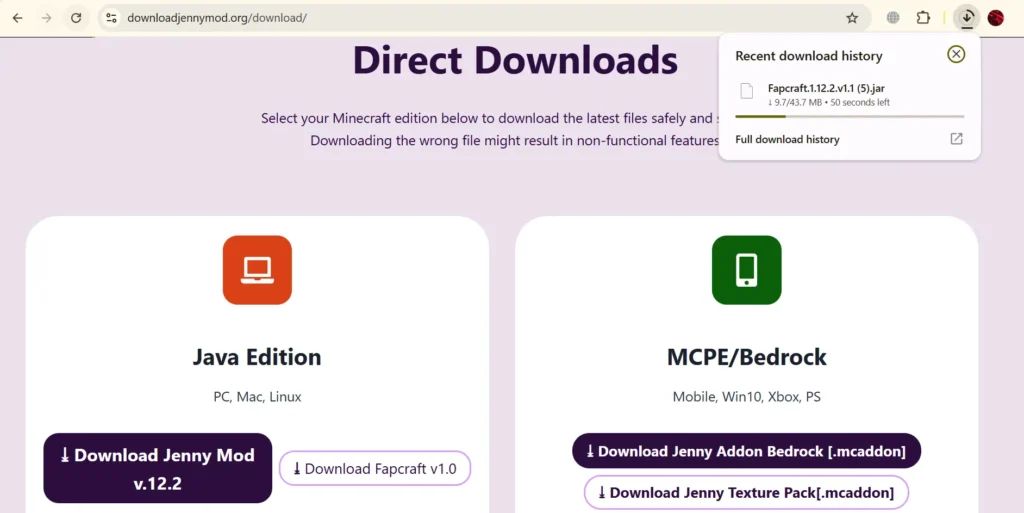
This is the simplest step in this whole procedure. What you need to do now is to move the downloaded .jar file to the Mods folder. As mentioned in the above steps, Minecraft will only admit the files that are present in the Mods folder. So despite being simple, this step is important as well. You can copy and paste the file from you downlaod section or simply drag and drop it into the folder. Now your Mods folder should look like this:
.minecraft/
└── mods/
└── Jenny-Mod-Forge-1.12.2-v1.9.0.jar
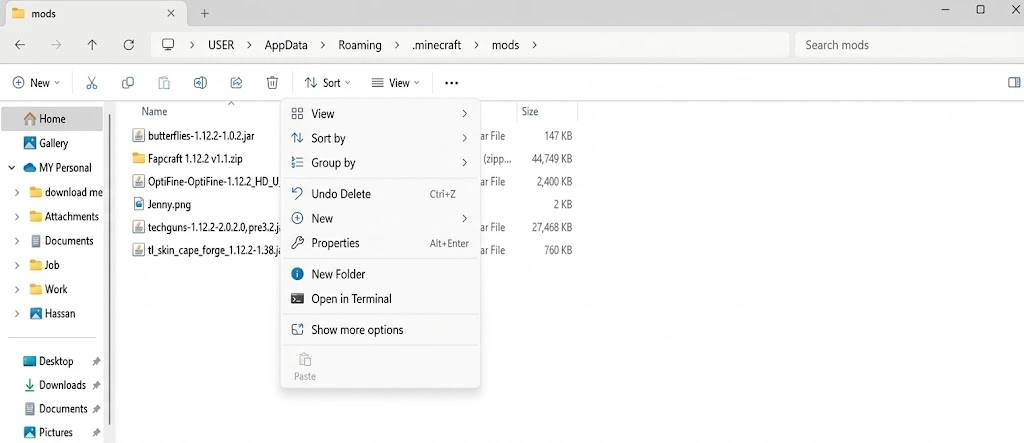
After placing the .jar file in the Mods folder, open the Minecraft launcher. Navigate to the new profile Forge1.12.2, which was created recently in step no 2. Click and press the start button.
Minecraft would load slowly for the first time, then usual, because Minecraft traces the file with Forge, i.e., present in the Mods folder. Once it loads completely and the main menu appears, click the Mods to confirm that the Jenny mod is listed. If it appears there, then the installation is successful; if not, then read the troubleshooting guide below.
After the complete successful installation process, you need to enable the Creative mode. You should not test it in your existing survival world, as it can prove unsatisfactory for your valuable survival world.
Once you’re in the world, open your inventory and go to the Spawn Eggs tab. Scroll through it — you’ll see a custom spawn egg for Jenny and the other characters (Ellie, Slime Girl, Bia Prowell, etc.).Place Jenny’s spawn egg and use it. She’ll appear in your world. For interacting with her, you need to get close to her and right-click. She will interact with you in return of emeralds__give her some from your inventory. For a complete character guide, visit our page
That’s your installation complete and confirmed working.
⬩➤Running Jenny Mod With OptiFine
OptiFine is a Minecraft performance and graphics mod that improves frame rates and enables HD textures and shaders. The good news is — Jenny Mod and OptiFine work together without issues, as long as you install OptiFine correctly.
For better outputs, all you need to do is install OptiFine as a Forge mod, not as a standalone profile.
>Download OptiFine 1.12.2 fromoptifine.net.
>Open the OptiFine installer
>Click “Extract” instead of “Install”.
>This saves OptiFine as a .jar file. Place that .jar file into your .minecraft/mods folder alongside the >Jenny Mod .jar.
Launch Minecraft with the Forge 1.12.2 profile as usual. Both mods will load together. If you install OptiFine as its own launcher profile (not as a Forge mod), it will conflict.
⬩➤Jenny Mod on PC vs Mobile — What’s Different?
| Feature | PC (Java Edition) | Mobile (Bedrock/MCPE) |
|---|---|---|
| Full character roster | Yes | Limited |
| All animations | Yes | Reduced |
| Uses Forge .jar | Yes | No (.mcaddon) |
| OptiFine support | Yes | No |
| Performance | Smoother | Varies by device |
| Installation difficulty | Moderate | Easier |
⬩➤Troubleshooting And Fixes
Jenny Mod is not showing in the Mods list:
It often happens that after installing the Jenny mod, it still does not appear in the mods list in Minecraft. The are 3 major reason for this
1: Broken or corrupted Mod file
2: Launching Minecraft without Forge
3: incorrect replacement of mod file
Downloading the Jenny mod from a random website results in a corrupted, broken, and virus-infected file. Make sure to download it from https://downloadjennymod.org/download/
Launching Minecraft from standard Minecraft profile result in not showing of jenny mod. You need to launch the game from the newly created profile named as Forgev1.12.2
And also ake sure that the directory of the mod file is
.minecraft/
└── mods/
└── Jenny-Mod-Forge-1.12.2-v1.9.0.jar
Just like many other mods, the Jenny mod also comes with some errors. The most common of those errors is explained in our guide, Jenny Mod troubleshooting and fixes. Make sure to visit this for a solution to your problems.
Final Words:
Installing Jenny Mod on PC is genuinely straightforward once you understand what Forge needs and why each step matters. The two things that trip people up most consistently are the Java version (it must be Java 8) and the Forge profile selection in the launcher. Get those right and everything else falls into place.
If you run into any issue that isn’t covered in the troubleshooting section above, drop a comment and we’ll help you sort it out.
Download the mod from downloadjennymod.org, follow the steps above, and you’ll have Jenny in your world within 10 minutes.
Jenny Mod was created by Schnurri_tv (SlipperyTum) as an independent Minecraft modification. This website is not affiliated with Mojang Studios or Microsoft. Minecraft is a trademark of Mojang AB.